
/image%2F0654964%2F20241204%2Fob_9a5cd9_unnamed.jpg)

Link on tag
This tutorial is property of Feline C31
its traduction is property of Evanescence

MATERIAL

Thanks to
Linda Ferdinand for woman tube
Frankie flower tube
FILTERS
Eyes Impact 5 / Backlight
Colors for this tutorial

1- Open a new raster of 950 /550 px
2- Put in layer color 1
Ouvrir le tube deco Beautiful moment 1
3- Sélect all
4- Copy tube deco 1 and paste it in selection
5- deselect
Open tube Beautiful Moment 2
6- Copy as new layer ( don't move it)
7- Blend mode on luminance
8- Merge down
Open flower tube by Frankie (or yours)
9- Copy as new layer
10- Resize at 120 % ( depends on your tube)
Sélection tool 
Position H 65 Vert. 10

11- Adjust, sharpness, sharpness
12- Duplicate
Sélection tool
Position Horiz -254 Vert 30

13- Duplicate
14- Image Mirror
Sélection tool
Position Horiz 712 Vert 7

15- Merge down
16- Opacity of layer at 50%
17- Move it under raster 2
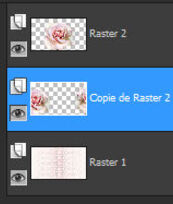
18- go back on top of pile
19- Copy as new layer deco Beautiful Moment 3
don't move
Open mask Maelle Dreams
20- Layer new layer
22- Fill it with color 2
23- Layer, new layer of mask from image
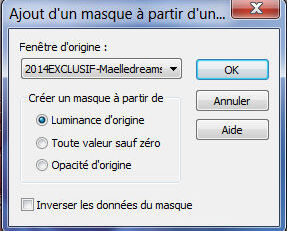
24- Merge group
25- Effect, edge effect , accentuate
Open woman tube Linda Ferdinand ( or yours)
26- Copy as new layer
27- Resize at 115 % , depends of your tube
tool selection
Position Horiz 547 Vert -33

28- Open brush Beautiful Moment
29- File /export /personnal brush
name it
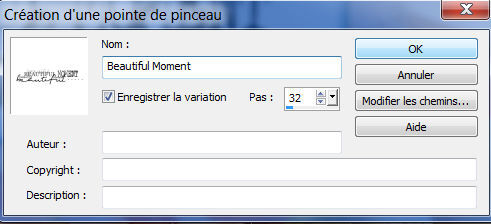
30- Brush tool 
look for your brush Beautiful Moment
31- Layer new layer
Values for brush here
size 400/Pas 32/ Density 100/Normal

Color 2
32- Place it like model
33-Drop shadow 1/1/40/10 black

34- Merge all
35- Add a border of 2 color 2
36- Add white border non symetric clicked, white color
as followed

37- Add a border non symetrix clicked color 2
as folowed

38- Sélect this border with magic wand
39-Filter Unlimited / Papier texture / Filter Paper

40- Sélection inverse
41- drop shadow 0/060/40 black

42- select none
43- Add a border of 15 white
44- Sélect this border
45- Sélection inverse
46- drop shadow 0/0/40/10 black color
open tube deco 4
47- Copy as new layer
selection tool
Position Horiz 29 Vert 20

48-add a border of 1 color 2
49-Sign your tag
Resize at à 900 pixels width
Thank you for following my tutorial
Féline

My version
Woman tube Luz Cristina that I thank


/https%3A%2F%2Fekladata.com%2FYPI8DwfBf4bU6fHRpkzcSxO2pDU%40500x338.jpg)
/https%3A%2F%2Fekladata.com%2F_hXetnNky_6mWLePzNC4_ZUg_NQ%40500x364.jpg)