
/image%2F0654964%2F20241204%2Fob_9a5cd9_unnamed.jpg)

Link on tag
This tutorial is property of Joanne
This traduction is property of Évanescence

MATERIAL

Thanks to DREVERS for beautiful tube.
and persons for material of tutorial
FILTRES
Unlimited, Buttons et Frames
Mehdi, Kaléidoscope 2.1
Flaming Pear, Flexify 2
Graphics Plus, Cross Shadow
1 - place sélection in sélections files
2 - place pattern in pattern files
3 - Settle your palette like this :

4 - open a transparent layer de 800x600 px
Select, select all
5 - copy flower picture and paste it into selection
Deselection
6 - effects, réflexion effects, rotatif mirroir :
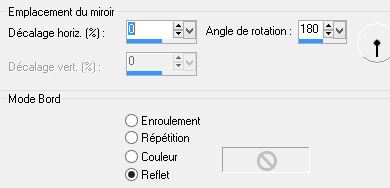
7 - Layer new layer
fill it with pattern
8 - filter Unlimited, Buttons et Frames, 3D Glass Frame 2

9 - image, resiez it at 60 %,
all layers unschecked
10 - selection, charge selection from disk:

11 - press on delete. Deselect
12 - filter Mehdi, Kaléidoscope 2.1 :

13 - filter Mehdi, Kaléidoscope 2.1 :

14 - distorsion, polar coordinations to rectangular
15 - filter, Mehdi, Kaléidoscope 2.1 :

16 - filter Flaming Pear, Flexify 2 :

17 - image inverse
18 - effects,reflexion effects, rotatif mirror like in step 6
19 - adjust, sharpness, more sharpness
20 - effects, 3D, drop shadow :

21 - copy and paste woman tube
Image, resize at 90 %
22 - adjust tube like model
23 - effects, 3D, drop shadow like step 20
24 - copy and paste my watermark in matériel
25 - sign your work
26 - layers, all flatten
27 - image, add borders :
1 of 2 pixels black
1 of 30 pixels white
1 of 2 pixels black
28 - with magical wand
sélect 30 pixels border
29 - put pattern again in border
30 - adjust, sharpness, more sharpness, repeat once
31 - effects, 3D, inner bevel :

32 - filter Graphics Plus, Cross Shadow défault
Deselect
33 - register in Jpeg


/https%3A%2F%2Fekladata.com%2FYPI8DwfBf4bU6fHRpkzcSxO2pDU%40500x338.jpg)
/https%3A%2F%2Fekladata.com%2F_hXetnNky_6mWLePzNC4_ZUg_NQ%40500x364.jpg)