
/image%2F0654964%2F20241204%2Fob_9a5cd9_unnamed.jpg)

Link on tag
This tutorial is property of Joanna
This traduction is property of Evanescence

MATERIAL

Thanks to DBK for tube
and to site PICSPEED for landscape
FILTERS
Graphics Plus, Cross Shadow

1 - Put selections in selections file
2 - Open a transparent layer of 800x600
Selection, select all
3 - copy and paste landscape image into selection
Deselect
4 - copy and paste woman tube
5 - image, resize at 55 %,
all layers not checked
6 - effects, image effects, offset :
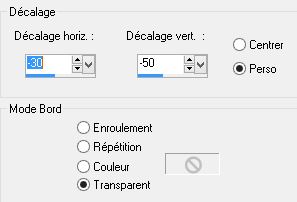
7 - adjust, sharpness, sharpness
8 - effects, 3D, drop shadow

9 - Merge all visible layers
10 - add a new layer, fill it up with black color
11 - Layer new layer of mask from image :
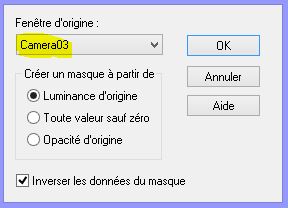
12 - Merge group
13 - image, resize at 90 %
14 - selection, charge selection, from disk :
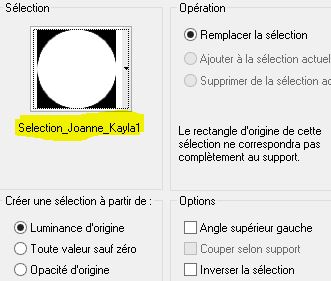
15 - sélection, transform into layer
16 - stay on this layer. Image, resize at 50 %
17 - go on on layer (groupe raster 1)
18 - press on delete on keyboard
Deselect
19 - go on firt layer on bottom of pile
20 - selection, charge selection, from disk :
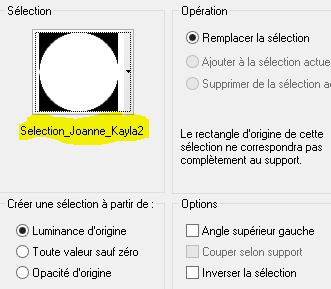
21 - sélection, inverse
22 - adjust, blur, gaussien blur at 15. Selection, inverse
23 - effects, 3D, drop shadow step 8
24 - do this drop shadow again but with value -5 vertical and horizontal.
Deselect
25 - sélection, charge selection, from disk:

26 - effects, texture effects, antic mosaic :

27 - sélection, inverse
28 - effects, 3D, drop shadox like steps 23 and 24
Deselect
29 - copy and paste my watermark in materiel
30 - sign your version
31 - layers , all flatten
32 - image, add borders :
1 of 2 pixels black
1 of 30 pixels color 5e2405
1 of 2 pixels black
33 - select border of 30 pixels with magic wand
34 - selection, transform into layer
35 - filter Graphics Plus, Cross Shadow , défault
36 - effects, textures, antic mosaïc like in point 26
37 - merge down
38 - effects, 3D, inner bevel :
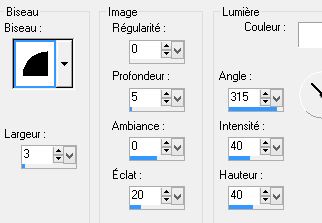
39 - deselect
40 - register in Jpg
Ma version
Tube femme de Joannie
que je remercie


/https%3A%2F%2Fekladata.com%2FYPI8DwfBf4bU6fHRpkzcSxO2pDU%40500x338.jpg)
/https%3A%2F%2Fekladata.com%2F_hXetnNky_6mWLePzNC4_ZUg_NQ%40500x364.jpg)