
/image%2F0654964%2F20241204%2Fob_9a5cd9_unnamed.jpg)
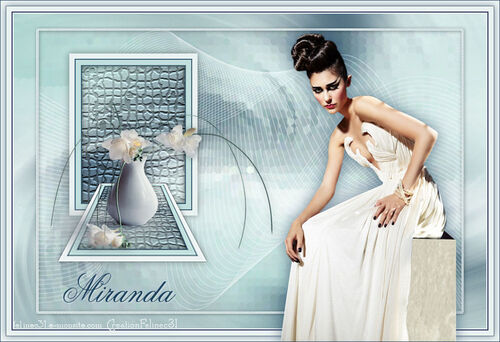
Link on tag
This tutoriel is property of Féline C31
This tutorial is property of Evanescence



RC Filter Pack 1.1 / RCS sequins
Texture/ Effet mosaïque
Colors of this tutorial
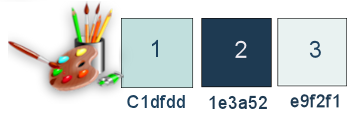
1-Open a transparent layer 900/600 px
2- Select all
copy and paste in selection tube fond pp20
3-selection none
4-layer new layer raster 2
5- fill layer with color 2
6-Open mask Aditas
7- layer of mask from image

8-merge group
9-drop shadow 2/2/40/20 black

10- effects 3d, image effects , seamless tiling
défault
corner

11-adjust,blur, radial blur
twirl

12-merge down ( raster 1)
13- edge borders accentuate
14-duplicate layer
15-Effect , plugin, RCS Filter Pak 1.0 / RCS Sequins

16-image resize at 90 % only one layer
17-Select all
18-floating selection
19-static selection
20-Selection, modify, select borders of selection
both sides

20 B- fill this selection with color 3
21- Texture effects, tiles
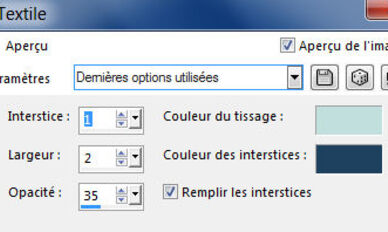
22-drop shadow 1/1/40/10 black
23-selection none
24-layer new layer raster 2
25-selection tool rectangle
26-personnalized selection 

27-fill selection with color 3
28-Sélection/ contract of 10
29-fill with color 2
30-Sélection/ contract of 2
31-fill with color 1
32-Sélection contract of 10
33- fill with color 2
34-Sélection/ contract of 2
35-Suppress on keyboard 
36-keep selection
37-go on raster 1
38- transform selection into layer
39-move layer down, under raster 2
40-plugin texture / Mosaïque

41-Inverse selection
42-drop shadow 0/0/60/20 black

43-selection none
44-go on raster 2 ( top )
45-merge down
46-drop shadow 0 0 /40 /20 black

47- duplicate layer
resize at 50
48-sélection tool /Perspective

49-take measure tool
50- pull corner of figure to 170 on left
see picture

51-M for deselection
52-Image flip ( vertical )
53-selection tool 
Position Horiz 69/ Position Vert 320

54-adjust, sharpness, more sharpness
55- go on layer copy of raster1
56-layer new layer
57-Open deco tube
58- selection tool, rectangle
personnalized selection

59-copy and paste into selection
60-put layer on overlay mode, opacity at 87

selection none
61-drop shadow 1/1/40/10 black

62-go on top of pile
63-Open tube of Maryse ( take off signature)
64-Resize at 50%
65-Image / Mirror
66-paste as new layer
67-sélection tool
68-Position Horiz 56 / Position Vert 168

69-drop shadow 1 /1/40/20 black
70-open text Miranda
71-Copier comme nouveau calque
72-selection tool
73-Position Horiz 114/ Position Vert 491

74-Effect 3D/ drop shadow 2/2/30/1 white color
borders
75- 2 px of color 3
76- 2 px of color 2
77- 10 px of color 1
78- 1 px color 2
79- 10 px of color 3
80-Select this border
81-inverse selection
82-drop shadow 0/0/60/20 color 2

83- selection none
84-Open woman tube Claudia Viza (take off signature)
85-layer new layer
86-Place it on right side see model
87-Effect 3D/ drop shadow color 2/2/50/30 color 2

88- add a border of 1 px color 2
89- Sign
Resize at 900 pixels width
save in Jepg
Tube de Tocha
Tube vase de SVB


/https%3A%2F%2Fekladata.com%2FYPI8DwfBf4bU6fHRpkzcSxO2pDU%40500x338.jpg)
/https%3A%2F%2Fekladata.com%2F_hXetnNky_6mWLePzNC4_ZUg_NQ%40500x364.jpg)