
/image%2F0654964%2F20241204%2Fob_9a5cd9_unnamed.jpg)
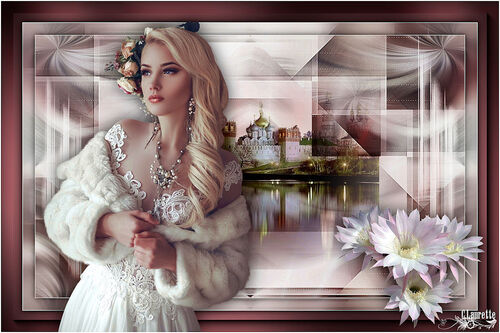
Link on tag
This tutorial is property of Graphisme Claurette
This translation is property of Evanescence


MATÉRIEL
Tube femme de Maryse

PLUGINS
Simple … Blintz
Plugin Galaxy / Instant Mirror
Len K’s Zitah....Zitah
Grafic Plus …Cross Shadow
AAA-Filters :Foto Frame
AAA-Filters …custon ….Sharp
Colors of this tutorial

foreground : #ffffff
background : #684145
1
1 - Open a transparent layer 900 x 550 pixels
2 - Sélection, sélect all
3 - Activate your tube
4 - copy
5-paste it into selection
6 - Selection none
7 - layers all flatten
2
1 - adjust, blur, radial blur

2 - Effects / Image effect seamless tiling
défault
3 - Effects / edge effect, accentuate more
3
1 - filter / Unlimited 2 / Simple … Blintz
2- Repeat a second time
3 -duplicate layer
image mirror
4 -Repeat filter simple Blintz
5- merge down
your should have this

4
21- filter / Plugin Galaxy / Instant Mirror …( Vertical Right)

2 - Effects / image effect, seamless tiling
default
3- adjust, sharpness, sharpen
5
(dont put any new layer, stay on this one
1 - layer of mask from image
2 - mask 0_75714_48371964_XL.
3- inverse marked

4 - layers all flatten
5- adjust, sharpness, high pass sharpen

6 - filter / Len K’s Zitah , défault

6
1- Open tube déco 1
(colorize if needed according your tube )
2 - copy paste as new layer
3- don't move it
4 – mode of layer on overlay or else according colors
7
1- open tube paysage
2 - Copy paste as new layer
3- dont move it
4 – mode of layer multiply or else
5- flatten layers
6-- edition copy
8
1- Add borders
2- 1 pixel white color
3- selection all
4- add 25 pixels black color
5- selection inverse
paste copied image into selection
6- adjust, blur , gaussian blur 15
7- selection inverse
8- Effect 3D / drop shadow 0/0/75/20 black
9- selection none
9
1- add 1 pixel white color
2- add 40 pixels #684145
(or other color )
3- select border with magic wand
4 -filter Grafic Plus …Cross Shadow , default
5- filter Foto Frame width à 25

6- selection none
10
1-open your principal tube
resize here at 85%
2-Copy and paste as new layer
3-place it on left side or right if you prefer
4- drop shadow 0/0/75/50 black
11
1- open flower tube
resize 2 times here at 75 %
2- Copy and paste as new layer
3 - drop shadow 0/0/75/50 black
12
1 - add a new layer
2- sign your tag
3 - Resite at 950 pixels width
4 - filter AAA-Filters …custom ….Sharp

5- selection all
6- add 2 pixels white color
Tube femme de Paulina Design


/https%3A%2F%2Fekladata.com%2FYPI8DwfBf4bU6fHRpkzcSxO2pDU%40500x338.jpg)
/https%3A%2F%2Fekladata.com%2F_hXetnNky_6mWLePzNC4_ZUg_NQ%40500x364.jpg)