
/image%2F0654964%2F20241204%2Fob_9a5cd9_unnamed.jpg)
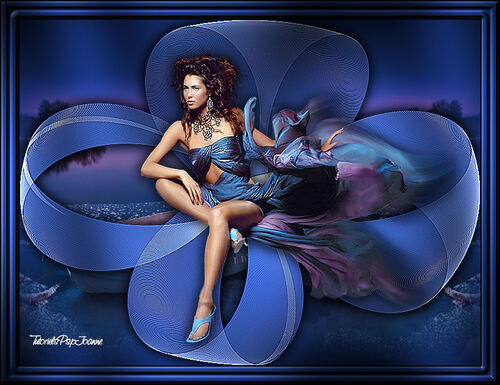
Link on tutorial
This tutorial is property of Joanne Tutorials
This translation is property of Evanescence

PLUGINS
DragonFly, Sinedots
Graphics Plus, Cross Shadow
MATERIAL

Un grand merci à MIN@ pour son magnifique tube du paysage
et au créateur du filtre Sinedots : Philipp SPOETH
Merci également à l'auteur du superbe tube féminin.

1 - Palette of colors , in foreground put color , here 122861
2 - open a transparent layer 800x600. fill with color
3 - plugin Graphics Plus, Cross shadow défault
4 - copy and paste misted tube as new layer
5 - Image effect, offset

6 - Reflexion effect , rotativ mirror
reflect

7 - new layer
paint again with the color of the beginning
8 - DragonFly, Sinedots (not version II) :

9 - edge effects accentuate more
10 - with magic wand , clic on all parts
i mentionned with a red spot
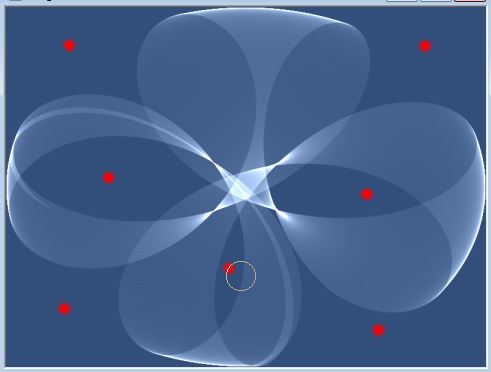
Result :
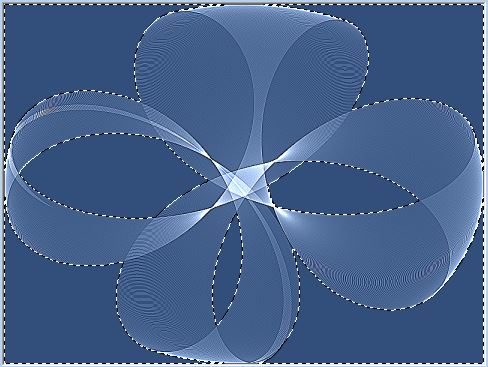
do not deselect before i will mention it
11 - suppress or delete on keyboard
12 - inverse selection
13 - effects, 3D, drop shadow :

14 - drop shadow again, with -2 vertical and horizontal
15 - selection, select all
16 - Graphics Plus, Cross Shadow default
17 - copier et coller le tube féminin
18 - image, resize at 110 %, only one layer
19 - adjust tube like model
20 - adjust, sharpness, sharp
21 - effects, 3D, drop shadow like in steps 13 / 14
22- copy and paste my watermark
23- sign your version
24 -flatter all layers
25 - image, add borders
1 of 2 pixels black
1 of 30 pixels white
1 of 2 pixels black
26 - with magic wand
select border of 30 pixels
27 - pint with color of the beginning
28 - effects, 3D, inner bewel :
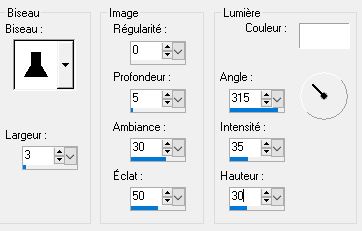
29 - Graphics Plus, Cross Shadow default
30 - deselect
31 - save as JPEG
Tube OBG
Paysage de Mina


/https%3A%2F%2Fekladata.com%2FYPI8DwfBf4bU6fHRpkzcSxO2pDU%40500x338.jpg)
/https%3A%2F%2Fekladata.com%2F_hXetnNky_6mWLePzNC4_ZUg_NQ%40500x364.jpg)