
/image%2F0654964%2F20241204%2Fob_9a5cd9_unnamed.jpg)

Link on image
PRINTEMPS
FROM
ROSE DES SABLES
MATERIAL
Click on flower to download

I thanks particulary for tubes
Corinne Vicaire –Alejandra Rosales-DWTUBES-Apo3_Groupe Schares
PLUGINS
Alien Skin/Impact/Glass -Texture Frame

Foreground : #eccd3e
Background: #896155
1/Open canal alpha in material/make a copy which will serve for your tag
Fill up with a linear gradient
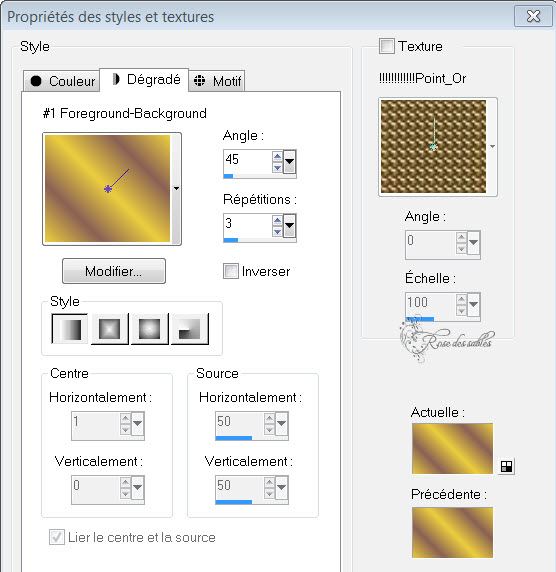
Rename this layer ' FOND "
2/On this layer/Sélection/charge a selection from canal alpha called Sélection 1
Promoted selection to layer

3/Fill it up with gradient/Promote selection to layer/ Désélect /
rename it as selection 1
4/Effects/ Texture Effects / blinds :

5/Effet 3D/Drop Shadow :
5 H 5V opacity 25 blur 10 black coor
6/Effet Géométrique/Perspective verticale :

Duplicate layer and resize it at 80%, all layers not checked
and push it on corner as shown on capture

8/Merged down with the layer bellow
9/Add a new layer/Sélection/charge sélection from canal apha Sélection 2
Promoted selection as layer
10/Fill up with gradient/Plugin Alien Skin/Impact/Glass :
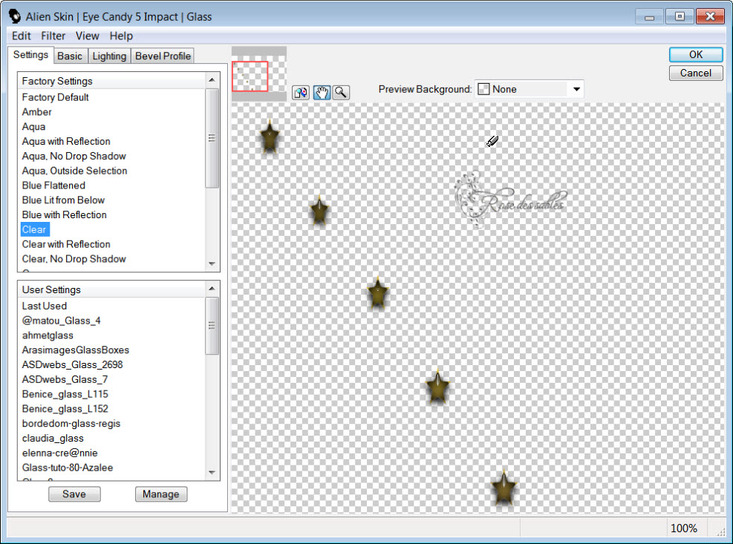
11/Désélect/push a little the stars to the top/rename this layer as selection 2
12/Merged down layer
13/Copy and paste as new layer Apo3-fractal
Effects, effects image, seamless tiling

14/Blend mode Luminance L, legacy /Opacity at 50/Place this layer above the one called Fond/
Move it to the bottom of tag/rename it FRACTAL
15/Layer/New layer/Sélection/charge from canal Alpha/Printemps Sélection 3
Promote selection to layer
16/Fill it up with your gradient / Texture Effects, Blinds :
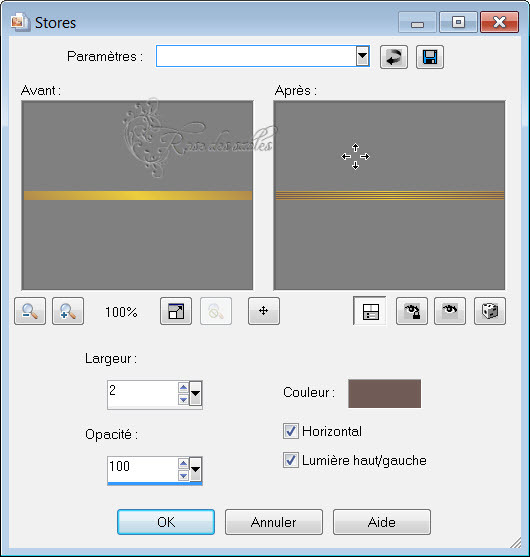
17/Désélect
18/ Géométrique effects/Skew

19/Duplicate/ resize at 80%/ push it down the first one on the right:

20/Add new layer/Sélection/charge from canal Alpha/choose Sélection 4
Promote selection to layer
22/Open picture 211/paste into Sélection/ Effet 3D Inner bevel :
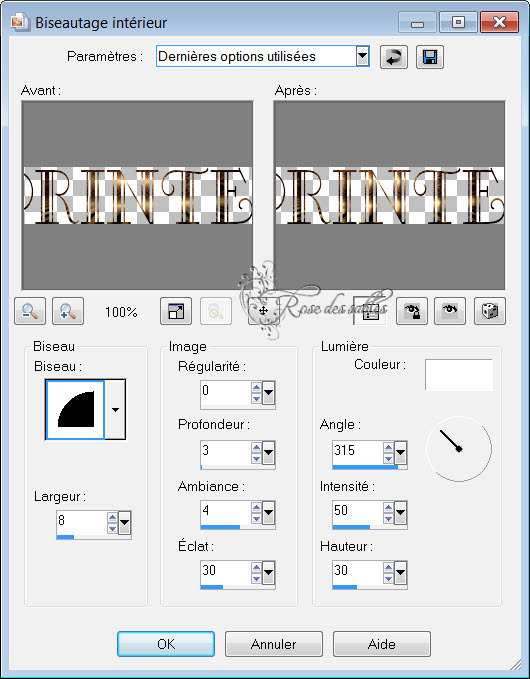
23/Désélect/rename this layer PRINTEMPS
24/Copy and paste as new layer tube e523b201 XL/resiez 2 times at 80%
Move it up just above layer FRACTAL
25/Add new layer/Sélection/charge sélection from canal Alpha/choose Sélection Promote selection to layer
Paste again picture 211 into Sélection/Désélect
26/Once again/ Glass effect/duplicate 3 times/place on orange flower or else, according your choice and ribbon also
27/Merge layers as many times you did until you have on layer with the stars/rename it Etoile
28/Add new layer/Sélection/charge from canal Alpha/choose Sélection 6
Promote selection to layer, fill it with picture 211/ still in memory
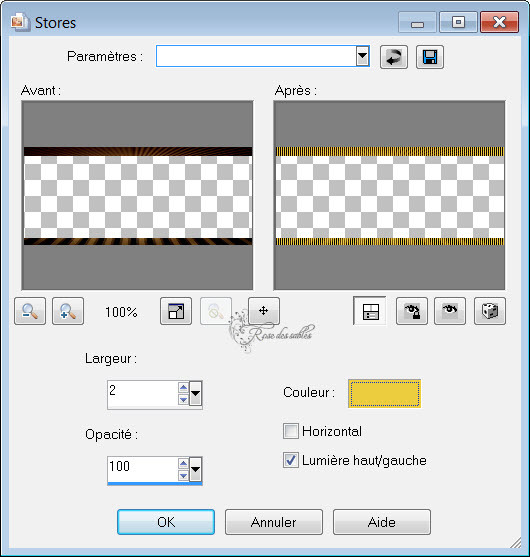
29/Texture effects/ Blinds :
30/Désélect
31/Put Drop shadow :

32/Sign your création/copy the base called fond/paste it as new image
we will need it later
33/Image add border of 2 dark color
34/Image add border of 2 clear Color
35/Image add border of 2 dark color
36/Change background raster as normal raster
37/Adjust/Neat/More neat
38/Image resize at 90% all layers not checked
39/Add a new layer/Sélection/Sélect all/ fill it with your " Fond" /Layer move down/keep selection
40/Effect/AAA Frame/ Texture Frame :

41/Go to raster on top /Sélection/Sélect all/floating/ and selecton Static/ Drop shadow:

Do again drop shadow with V&H négatives values
42/Désélect
43/Image add a border of 2 dark color.
44/Copy ans paste tube DWTUBES /image resize 1x 60% & 2x 80%
Place it at bottom on the left
45/Copy ans paste tube de Corinne Vicaire/image resize 1x 60%/ place it on the right at the bottom of tag/Put drop shadow like at point N°31

46/Adjust/Neat/Neat
47/Merged all layers
Export as JPG
I hope you enjoy my tutorial and
Thank you for doing it
Rose des Sables

My version
Flower tube found on the web
Woman tube Gabry which I thank



/https%3A%2F%2Fekladata.com%2FYPI8DwfBf4bU6fHRpkzcSxO2pDU%40500x338.jpg)
/https%3A%2F%2Fekladata.com%2F_hXetnNky_6mWLePzNC4_ZUg_NQ%40500x364.jpg)