
/image%2F0654964%2F20241204%2Fob_9a5cd9_unnamed.jpg)

FRANIE
BY MARIA JOSE PRADO
( BUTTERFLY )

( Link on image )
MATERIAL
click on flower to download

FILTERS
Help yourself with this arrow to follow this Tut

1.- Prepare rectangular gradient
Foreground dark color - Background light color
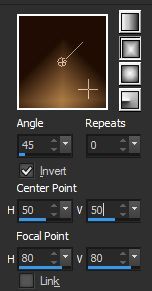
2.- Open a clear layer 900x600px, fill up with gradient
3.- Filter VMDistortion, Radiator II, défault

4.- Filter Mehdi, Weaver, Size 350

5.- Layer duplicate
FilterVM Experimental Guess What

6.- Filter Transparency, Eliminate Black
7.- Change the blend mode for " screen"
8.- Filter Carolaine & Sensibility, cs_texture, défault
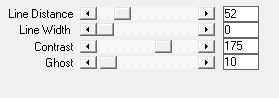
9.- Effects, Image effects, seamless tiling
corner, Horizontal, Transition to 100

10.- Filter Simple, Pizza Slice Mirror
11.- Filtre, FM tile Tools, Blend Emboss, défault
12.- On same layer - Sélection, Charge sélection form disk franie_mj
13.- Sélection, Promote selection to layer
14.- Plugin AAA Frames, Foto Frame

Drop shadow 0, 0, 50, 20, black color
15.- Sélection, Modify, contract to 10
Répeat drop shadow
16.- Copy your tube, here, Karina Dreams pretty face
and paste it as new layer
ajust it to center and resize it , if you need
17.- Inverse selection- click on suppress button ( delete ) -
Inverse selection again
Duplicate layer
Adjust , blur, radial blur
Twirl , elliptical , as on capture

Filter Carolaine & Sensibility, CS_LDots, défault

Adjust sharpness, more sharpness
Layer move down
Layer - Activate supérior layer- Merge down
layer move down- Activate supérior layer- Merge down
Deselecte all
- Drop shadow 0, 0, 50, 20, black color
18.- Close visibility layer of tube
and merge all others layers
19.- Duplicate layer - Effects - géométric effects
Perspective Vertical (-50) Transparent
20.- Take selection tool , the arrow or click on letter K
install l script- preset_majo _1
( which is in matérial )
if you dont kow I explain
You can install it in your default parameters of your psp click on arrow then of selection tool give it a name ans click on name it will open it directly
and deselect by click on M
21.- Effects, Drop shadow 0, 0, 50, 20, black color
22.- Give visibility to your tube
Frame it well
23.- Plugin Eye Candy 5, Impact, Perspective Shadow - Preset shadow_mariajose
24.- Merge all visible - Add new layer
Fill it up with you light color- Opacity to 80%
25.- Add a new mask layer from image - mask_franie -
Merge group
26.- Edge Effects, accentuate, or accentuate more
depends on your colors
27.- Effects, Drop shadow 5, 5, 50, 5, black color

28.- Put blend mode of layer in " sreen mode" -
adjust opacity according the choosen colors
29.- Copy and paste décorativ tube, ici
Maxyran 05 11 deco ( vase ) like on model
- Repeat Eye Candy 5 - Perspective Shadow
(if needed adjust height of your shadow)
30.- Copy and paste as new layer - deco_franie_mj
Effects, image effects, offset

31.- Image , add a border of 1px your dark color
32.- Image , add a border of3px your light claire
33.- Image , add a border of 1px your dark color
34.- Sélection - Select all - Édit copy
35.- Image , ajust a border of 40px white color
36.- Inverse selection - paste into it your copied image
37.- Filter, Simple, Pizza Slice Mirror
38.- Effects, Réflexion Effects - Rotating Mirror

39.- Inverse selection - Drop shadow 0, 0, 60, 30, black color
40.- Deselect all - Copy and paste the text tube franie
colorize in your colors
41.- Resize your image to 900px width largeur -
Sign et register your creation in JPG
I hope you liked this tutorial
and I thank you to have done it
Maria José
Ma version
Tube femme de Mica
Tube fleur de Karina Dreams
que je remercie


/https%3A%2F%2Fekladata.com%2FYPI8DwfBf4bU6fHRpkzcSxO2pDU%40500x338.jpg)
/https%3A%2F%2Fekladata.com%2F_hXetnNky_6mWLePzNC4_ZUg_NQ%40500x364.jpg)